
Saturday, June 20, 2009

Friday, June 12, 2009
PHEW!

Well this semester just whizzed by. I won't miss the break neck speed (although I did get really good at multi tasking while listening to podcasts) but I actually will miss the content. I feel a fewer steps closer to being an actual library technogeek and not just a wannabe. I can hang with the lingo and my eyes don't immediately start rolling backward when someone starts talking cloud computing, content management systems, or even digital whatchamacallits. Honestly, I think this should be a required class for MLIS students and not just an elective. Because if you don't know this stuff, you're going to be left in the dust...
Copy of sharp_gerblick final
Lisa Sharp
Katherine Gerblick
Successful Use of Web 2.0 Technologies in Libraries
On Wednesday, June 10, 2009, at 5:22 a.m. ET, the term “web 2.0” became the one-millionth word in the English Language (Sutter, 2009). This estimation was determined by the Global Language Monitor, which is a website that calculates the number of words created by using a mathematical formula (Sutter, 2009). According to the Global Language Monitor, “web 2.0” is defined as, “a technical term meaning the next generation of World Wide Web products and services,” which involves a more social generation of the Internet (Blair, 2009). Libraries worldwide have been increasingly using web 2.0 technologies to improve and expand the services they offer. This paper discusses in detail a few unique libraries that have successfully transformed web 2.0 technologies into those of library 2.0.
The University of Montevallo, located in Alabama, is a public liberal arts college that was founded in 1896. With enrollment generally averaging 3,000 students, the college boasts a strong student/faculty ratio of 16 to 1. The school’s mission is to provide students with an “educational experience of high quality,” including programs designed for “intellectual and personal growth in the pursuit of meaningful employment and responsible, informed citizenship.” To help meet the goals of the school’s mission, the University of Montevallo’s library, the Carmichael Library, created its own mission statement, which involves “…providing and promoting a user-centered information gateway to the resources and services needed to support the University curriculum.” In addition, the library strives to, “identify, acquire, and organize resources to enhance access to information and…will create additional access points as delivery of information evolves.” Finally, the Carmichael Library pledges to, “…cultivate a level of service that effectively and efficiently meets the information needs of students, faculty, and staff” (University, 2009).
In order to meet the goals of its mission statement, the Carmichael Library uses a variety of web 2.0 technologies. One of the most impressive of its social technologies is the library’s Facebook account. The library’s Facebook page provides viewers with valuable information, such as library hours of operation and upcoming events. Jason Cooper, the Technology and Technical Services Librarian at the university, claims that the library director, Rosemary Arneson, began urging the exploration of Facebook in the fall of 2007. By then, almost 70% of library staff had their own personal Facebook accounts. In April of 2008, the library created its own institutional profile. This decision was based on the fact that other schools that the Carmichael Library was tracking, like Mississippi State University, had started to create Facebook accounts. Because most staff members at the library already had individual Facebook accounts by this time, they understood the importance of an institutional Facebook page and were enthusiastic about the idea (J. Cooper, personal communication, June 8, 2009).
According to Facebook records, the Carmichael Library has 133 fans. Mr. Cooper feels that these patrons are mostly interested in the library’s Facebook page for its photos and notes, and only a few fans actually sign up for library programs via Facebook. Regardless, Mr. Cooper strongly recommends that more libraries, especially academic ones, should be active in Facebook, for it is a great way to meet users “where they are.” He also suggests that public libraries create a MySpace account as well, since MySpace “caters more to the at-large audience” (J. Cooper, personal communication, June 8, 2009).
In the interview with Mr. Cooper, he greatly emphasized the importance of having a library director who was more than willing to support experimentation with social networking sites. In addition to providing chat reference, the Carmichael Library also has a Flickr account. New pictures are posted to the account nearly every month, which is popular among students. Since the launch of the library’s Flickr account in 2007, they have logged 4,098 photo views! Furthermore, the Carmichael Library just began to experiment with Twitter in March of 2009. Although Mr. Cooper was at first skeptical that the library’s Twitter account would have many followers, he was pleasantly surprised. The president of the University of Montevallo, Philip Williams, also recently created a Twitter account, and students at the school seem to be increasingly following both accounts. One of the university’s older web 2.0 technologies is its blog. The library’s blog was created in the spring of 2006 and has been updated 368 times since then (J. Cooper, personal communication, June 8, 2009)!
The Carmichael Library can already boast having two custom RSS feeds, one for browsing popular titles and one for the reference collection, but a third RSS feed is currently under construction. This upcoming RSS feed will be for DVD acquisitions. Mr. Cooper states that the future of the Carmichael Library’s web 2.0 technologies will hopefully be a better integration between the 2.0 implementations and the website. In this ever-changing world of technology, there is always room for improvement (J. Cooper, personal communication, June 8, 2009)!
In addition to Alabama’s Carmichael Library, libraries across Georgia have also been using unique web 2.0 technologies to enhance their services. For example, the PINES system was created by the Georgia Public Library Service to provide patrons with greater access to information.
The mission statement of the Georgia Public Library Service is both uplifting and succinct: “Empowering libraries to improve the lives of Georgians.” A program of the Georgia Public Library Service, Georgia Library PINES (Public Information Network for Electronic Services) is the public library automation and lending network for more than 275 libraries and affiliated service outlets in almost 140 counties. It creates a statewide "borderless library" that provides equal access to information for all Georgians. Georgians with a PINES library card have access to materials beyond what is available at their primary branches and can reap the benefits of a shared collection of 9.6 million library materials that can be delivered to their home library branch free of charge (Georgia, 2009). Tim Daniels, the Assistant State Librarian for Technology and Infrastructure for Georgia Public Library Service was gracious enough to provide an interview via email. While the focus of the interview was on Evergreen, the open source Integrated Library System (ILS) upon which the statewide consortium PINES runs, we also discussed some of the other library 2.0 technologies that are currently used in the PINES system as well as some technology that Tim hopes to integrate in the future.
The GPLS Strategic Plan adopted in December 2007 stated that one of the technology goals states that “the library community will have access to resources that enhance understanding and use of current and future technology.” Tim Daniels elaborates on this statement by stating that “One of the things we do here at GPLS is provide Wide Area Network (WAN) access to most of the public libraries in Georgia and even though the WAN is not very Web 2.0 it provides the pathways (or pipes) for all Web 2.0 technologies to travel. So one of the things I have to think about is will this Web 2.0 technology (say YouTube for instance) take up a lot of the bandwidth (clog the web pipes). So I try to take a look at most web 2.0 tech with that in mind. Plus many of our libraries rely on us to help them understand the uses of web 2.0 tools” (T. Daniels, personal communication, June 9, 2009).
In order to understand PINES’ Open Source ILS it is necessary to take a look at the course of events leading up to its conception. Mr. Daniels explained that PINES came into existence for two main reasons. First, several ILS vendors of the smaller Georgia libraries were not going to make their systems Y2K compliant which meant that as of January 1, 2000, these libraries would have no ILS. At the same time, the state government was interested in creating a state-wide library card. These two ideas helped build the foundation of PINES. A proprietary ILS vendor was used for the state wide consortium but significant problems cropped up quickly. The size and scope of PINES was too large for the Integrated Library Systems on the market and Evergreen was built in-house in order to fulfill the needs of the consortium. It was decided that the code would be open source and collaborative from the onset. There was significant staff involvement in the development of Evergreen and now that other library systems are using Evergreen the input has grown exponentially. With that sort of hands on involvement, the staff often feel more dedicated to their ILS than they would otherwise using a proprietary ILS.
Mr. Daniels noted that “Many of the other tools folks have associated with web 2.0 (tagging, comments, RSS) are not currently functional in Evergreen.” Drupal, an open source Content Management System, is used by GPLS to house multiple GPLS sites in addition to 15 Georgia public library system sites. Mr. Daniels also stated that although they do not currently follow a best practices model they are working on it for the near future.
Mr. Daniels is very interested in following trends in library technology and technology in general. He stated that he tracks around 100 blogs and reads many technology magazines and publications and is careful to pay attention to technology beyond libraries in order to assess what technology could possibly be applied in a library setting. He correctly notes that “If you only track technology in library publications you will always be behind.” He also mentioned that this summer the technology team was going to experiment with Cloud Computing and stated that, “We are going to try to establish a server that feeds resources to a group of terminals. By doing this we hope to give our libraries a resource that could double the life cycle of their public access computers.” They do not currently have a way to track usage statistics but will be conducting an “environmental scan of the technology in the public libraries in Georgia this summer.” In regards to justifying resources towards a virtual presence, Mr. Daniels sums up his outlook by quoting John Houser: “You should put as many resources in your virtual presence as you put in a branch of your library." Many patrons will visit an E-location but rarely do the go beyond their local branch. The interview was concluded with a question regarding his thoughts on learning library 2.0 technologies and advice he might share with new librarians. He summed it up by mentioning that, “the technology is the easy part. The hard part is to stay curious and be willing to experiment with the technology and also be willing to let a 2.0 tool go if it is not serving the needs of your users not all technologies are applicable to all libraries.”
References
(2009). Georgia public library service. Retrieved June 10, 2009, Web site:
http://www.georgialibraries.org/public/pines.php
(2009). Univesity of montevallo. Retrieved June 10, 2009, Web site:
http://www.montevallo.edu/default.shtm
Blair, Maverick (2009). Global Language Monitor. Retrieved June 10, 2009, Web site:
http://www.languagemonitor.com/
Sutter, John (2009, June 9). English gets millionth word . Retrieved June 10, 2009, Web
site: http://www.cnn.com/2009/TECH/06/10/million.words/
Monday, June 8, 2009
Assignment 4
Joining DSpace was very simple and I was immediately struck by how easy it was to navigate around the website. It took me a while to figure out where the metadata registry was but once found, it was easy to add a field. I chose to add a subject field because I actually understood what that field meant. After I emailed Larry requesting that he add the field, I decided on what sort of collections I should add and then picked out materials to upload. Adding a collection was very simple but my creative juices are flagging at this point in the Maymester so I was hard pressed to come up with information to add to the fields. Usually that's my favorite part of an assignment like this. Once I figured out what I was going to add, I started the process without many problems. Many of the fields didn't ring a bell for me so I just filled out the ones that were familiar.
The same was true for adding to the collections. I was unsure how all of the restrictions would actually pan out once I got started developing my collection so I chose all of them instead of trying to figure out how each one would work. I added a logo to my health collection (which didn't end up really being about health--I added a cookie recipe to the collection) and I thought it looked really nice. Again, the program is so user friendly and adding a logo was super easy. I appreciated the *lack* of choices with this program as compared to Wordpress which had so many choices that I never felt like I had my bearings. DSpace felt more like Blogger to me. All the choices were plainly written, easy to find and above all SIMPLE. My cataloging skills leave a lot to be desired so boning up on those and learning more about DC would be necessary in order to use this program sufficiently but I found the program itself to be pretty darn great. All of the advanced searching was equally easy to maneuver. I chose to search: MLIS, libraries, health and cookies (not all at the same time) and got succinct responses. Now our little community is mighty small so I don't know what the searches would look like with tons of information. Overall, I felt a lot more comfortable in this work environment than Wordpress and I feel like I learned a lot.
http://mlis.library.gatech.edu/handle/123456789/73
http://mlis.library.gatech.edu/handle/123456789/76
http://mlis.library.gatech.edu/handle/123456789/111
The same was true for adding to the collections. I was unsure how all of the restrictions would actually pan out once I got started developing my collection so I chose all of them instead of trying to figure out how each one would work. I added a logo to my health collection (which didn't end up really being about health--I added a cookie recipe to the collection) and I thought it looked really nice. Again, the program is so user friendly and adding a logo was super easy. I appreciated the *lack* of choices with this program as compared to Wordpress which had so many choices that I never felt like I had my bearings. DSpace felt more like Blogger to me. All the choices were plainly written, easy to find and above all SIMPLE. My cataloging skills leave a lot to be desired so boning up on those and learning more about DC would be necessary in order to use this program sufficiently but I found the program itself to be pretty darn great. All of the advanced searching was equally easy to maneuver. I chose to search: MLIS, libraries, health and cookies (not all at the same time) and got succinct responses. Now our little community is mighty small so I don't know what the searches would look like with tons of information. Overall, I felt a lot more comfortable in this work environment than Wordpress and I feel like I learned a lot.
http://mlis.library.gatech.edu/handle/123456789/73
http://mlis.library.gatech.edu/handle/123456789/76
http://mlis.library.gatech.edu/handle/123456789/111


Friday, June 5, 2009
Interview with Darin Givens from GPLS
I was fortunate to have an interview with Darin Givens, the Webmaster and Communications Specialist for the Georgia Public Library Service. Here is the transcript of our conversation.


• To begin with, can you please share a bit about your background and your job description?

I have been working in Web design and development for 10 years. At GPLS, my position is Communications Specialist/Webmaster. I'm the administrator for the GPLS web server which houses our multiple GPLS sites plus those for 15 Georgia public library systems. I manage and designed: the main GPLS site, georgialibraries.org; Friends of Georgia Libraries, georgia-friends.org; our two intranets sites. I also developed and designed several other sites for GPLS-affiliated library organizations, with most of those sites being built on either the Drupal or Joomla content management systems.

Another part of my job is to provide help to the library systems of Georgia with their web services. I give them guidance for web redesign issues and content management strategies.


• How and where did  you hear about CMS? What were your motivations to adopt CMS for its current use (library website or any other purpose)?

I can't remember my introduction to CMS. I assume I read about them in the web development blogs and sites I frequent. I originally attempted to build my own CMS using PHP for my GPLS projects, but realized that it was going to take more time than I could spend considering my other job duties. I tested installs of Joomla and Drupal on our web server to try them out and found them to be very flexible and able to meet the needs of several projects I've worked on in the last couple of years.

My main motivation for suggesting a CMS for a project is to allow web editors to provide site content without going through the learning curve  -- and purchase of -- software such as Dreamweaver. I do use that software myself for editing code and like it, but I recommend that novice content providers work within a CMS framework instead so that they don't have to learn to use FTP for uploading (Dreamweaver has a built-in FTP device).


• What was your decision making criteria?

Number one was allowing multiple staff members in an organization to edit web content without needing to learn HTML editing and FTP software. I also wanted to have the ability to customize and easily maintain a stable template for the pages in a site.

Another main concern of mine is making sure that the HTML files as rendered in a browser comply with standards for web usability for people who use assistive browsing technology, such as the blind and visually impaired.

Drupal and Joomla, the two open-source CMS I use, both fit those criteria.

• What are the important benefits or advantages of the CMS that you are using now over the old system or another CMS that you've used in the past? How was the learning curve?

The important advantage of Drupal and Joomla to me is the ability to add on many different optional devices to enhance the features of the CMS as befits a specific project. The learning curve has been steep for me as a web developer since I get into the details of the source code of these CMS to tailor them to fit my needs as specifically as possible.


• Do you have any additional comments or observations you'd like to share about your experiences with CMS?

Using a CMS can provide a huge advantage to many web sites and I recommend that everyone building a site consider using one. Nonetheless, there are certainly situations where a CMS would not provide a considerable advantage to a site and may even be too cumbersome to implement. A small site with only a few pages that is maintained by a single person may very well be better off without a CMS.
Sunday, May 31, 2009
assignment 2 lib 2.0
To begin this project I created an account with Wordpress although apparently, at some point in the recent past, I already had an account. The registration was super simple but I was quickly flummoxed as to how to toggle between my dashboard and the blog. Through a fair amount of trial and error, I figured it out. I then posted a general check-in to the group followed by a short bio with a picture. Posting was straightforward and I had to go back and edit a few things I had written and add tags, both of which were no problem. I realized that I was supposed to post my bio under the team bio page and but when I edited my bio post I did not see where I could change that category. I asked my team for ideas on how to change it and when Suzanne posted her idea for a solution I figured it would be a snap to fix the next day. Well I forgot about it the next day and when I did go back to change it a full day later I did not see what she was talking about. I fiddled around with that for a good bit and asked my husband to help me figure it out but we were both stumped.
I learned more about the program just by poking around and playing with the themes and add ons but I never did figure out how to change the post category. I also misunderstood what the difference between what add ons/plugins/widgets are. I thought a blog roll would be nice to have as I often seek those out on blogs that I like. So I added two blog listings and created short descriptions of the blogs (librarian.net and tametheweb.com) and then did the preview and .... they weren't there. Again, this seemed like a it should be terribly obvious but I couldn't figure out why it wasn't appearing on the blog. Several head slaps later I realized that I had not added the blogroll widget. So I had been editing it but it wasn't actually activated or added or however you say that. :) I thought the themes were a little boring but the basic ones were easy to manipulate. The one our group picked,Arclite, was the nicest looking of the basic lot but with more time allotted for the project I probably would have pursued adding a different one. I did download a few I thought were interesting but could not figure out how to upload them. Yes, there is a definite pattern of "Lisa gets stumped easily with WP" in this assignment. I enjoyed working with my teammates and found their comments helpful. They added some very cool widgets and plugins and I had fun playing around with them (especially the add to any plugin)and posting things to this blog as well as my other blog (librarytechnogeekery.blogspot.com).
Overall I learned a lot about Wordpress and am glad to have had this short experience with it. I would probably want to get a book on the subject if I was planning on using it professionally seeing as I have a steep learning curve.
http://www.valdosta.edu/~foguz/mlis7505/team5/
http://www.valdosta.edu/~foguz/mlis7505/team5/?cat=18
I learned more about the program just by poking around and playing with the themes and add ons but I never did figure out how to change the post category. I also misunderstood what the difference between what add ons/plugins/widgets are. I thought a blog roll would be nice to have as I often seek those out on blogs that I like. So I added two blog listings and created short descriptions of the blogs (librarian.net and tametheweb.com) and then did the preview and .... they weren't there. Again, this seemed like a it should be terribly obvious but I couldn't figure out why it wasn't appearing on the blog. Several head slaps later I realized that I had not added the blogroll widget. So I had been editing it but it wasn't actually activated or added or however you say that. :) I thought the themes were a little boring but the basic ones were easy to manipulate. The one our group picked,Arclite, was the nicest looking of the basic lot but with more time allotted for the project I probably would have pursued adding a different one. I did download a few I thought were interesting but could not figure out how to upload them. Yes, there is a definite pattern of "Lisa gets stumped easily with WP" in this assignment. I enjoyed working with my teammates and found their comments helpful. They added some very cool widgets and plugins and I had fun playing around with them (especially the add to any plugin)and posting things to this blog as well as my other blog (librarytechnogeekery.blogspot.com).
Overall I learned a lot about Wordpress and am glad to have had this short experience with it. I would probably want to get a book on the subject if I was planning on using it professionally seeing as I have a steep learning curve.
http://www.valdosta.edu/~foguz/mlis7505/team5/
http://www.valdosta.edu/~foguz/mlis7505/team5/?cat=18
Struggling to "get" Wordpress
For some reason or another Wordpress just doesn't make sense to me visually. I have spent a lot of time this week hunting and pecking around the site to do the most basic of things. I never could figure out how to move a post from one category to another! On the other hand, using blogger was a no brainer. It's very simple and the command words make sense to me. I felt like a reasonably intelligent person while using it. Wordpress, on the other hand, makes me feel like a dunce. I know it's supposed to be simple and user friendly but this user feels like she's banging her head against a wall. I really hate feeling like I'm spending a lot of time doing something that should be easy while I have a bazillion other things to do in class. Grrrrrrrrr.
Friday, May 29, 2009
Drupal and Libraries
Check out this SlideShare Presentation:
Drupal and Libraries
View more OpenOffice presentations from Ellyssa Kroski.
Wednesday, May 27, 2009

Sunday, May 24, 2009
Assignment 1
Part 1: Blogging
I found this part of the assignment refreshingly fun and straight forward to use. I created a blog named librarytechnogeekery.blogspot.com which took virtually no time at all to get up and running. I already had a google account and understood how blogspot basically worked. I had fun fine tuning the settings and backgrounds and then moved onto adding gadgets and getting a feel for the different pertinent and not so pertinent add ons that I could have on my blog. I had never used the "follow blog" button before and got a little confused as to what the difference between rss feeds and following blogs was. It's still a little gray. :)
Part 4: Wiki
Describe main characteristics of the library and goal of the wiki: This wiki is for a large public library system (Dekalb County Public Library) that contains 26 individual branches and serves a major metro Atlanta county. The wiki is to be used for staff purposes only and will remain internal. The goal of the wiki is to create both uniformity and information sharing between the branches in regards to both policy and workflow issues.
Identify the library's requirements for a wiki: Nearly 200 employees will have access to this wiki with varying degrees of technical expertise. The software must be simple to use and no code writing should be required in order to post to the wiki. It should be reasonably flexible, large and easy to use. Pages should be archived so that employees can review information as necessary. The software will be maintained by a small staff of IT folks but will primarily be worked on by the library staff. Due to budget constraints, it needs to either be Open Source or low in cost.
Choose a wiki that meet the library's requirement: After narrowing it down to a choice between PhpWiki, MojoMojo and WackoWiki, I chose PhpWiki because it contained the following criteria: installable software, WYSIWYG editing, page history, uses a database, and is free/OSS.
I found this part of the assignment refreshingly fun and straight forward to use. I created a blog named librarytechnogeekery.blogspot.com which took virtually no time at all to get up and running. I already had a google account and understood how blogspot basically worked. I had fun fine tuning the settings and backgrounds and then moved onto adding gadgets and getting a feel for the different pertinent and not so pertinent add ons that I could have on my blog. I had never used the "follow blog" button before and got a little confused as to what the difference between rss feeds and following blogs was. It's still a little gray. :)
http://librarytechnogeekery.blogspot.com/
Part 2: RSS feeds
The regular rss feed was no problem to do but creating a stand alone rss feed on rapidfeeds was a little confusing to me. I created an account, tied it to my blog but didn't realize that I wasn't finished until I put in specific blog posts and a description of those posts. I think I understand it better now. http://feeds.rapidfeeds.com/23471/ http://librarytechnogeekery.blogspot.com/feeds/posts/default
Part 3: Online RSS aggregator
I have been using the Thunderbird rss aggregator so the google aggregator was new to me. It's actually easier to use than my thunderbird aggregator and I set it to my default. I now have lots of feeds for my classmates blogs, the MLIS blog and library blogs that I've discovered through this class.
Part 2: RSS feeds
The regular rss feed was no problem to do but creating a stand alone rss feed on rapidfeeds was a little confusing to me. I created an account, tied it to my blog but didn't realize that I wasn't finished until I put in specific blog posts and a description of those posts. I think I understand it better now. http://feeds.rapidfeeds.com/23471/ http://librarytechnogeekery.blogspot.com/feeds/posts/default
Part 3: Online RSS aggregator
I have been using the Thunderbird rss aggregator so the google aggregator was new to me. It's actually easier to use than my thunderbird aggregator and I set it to my default. I now have lots of feeds for my classmates blogs, the MLIS blog and library blogs that I've discovered through this class.
Part 4: Wiki
Describe main characteristics of the library and goal of the wiki: This wiki is for a large public library system (Dekalb County Public Library) that contains 26 individual branches and serves a major metro Atlanta county. The wiki is to be used for staff purposes only and will remain internal. The goal of the wiki is to create both uniformity and information sharing between the branches in regards to both policy and workflow issues.
Identify the library's requirements for a wiki: Nearly 200 employees will have access to this wiki with varying degrees of technical expertise. The software must be simple to use and no code writing should be required in order to post to the wiki. It should be reasonably flexible, large and easy to use. Pages should be archived so that employees can review information as necessary. The software will be maintained by a small staff of IT folks but will primarily be worked on by the library staff. Due to budget constraints, it needs to either be Open Source or low in cost.
Choose a wiki that meet the library's requirement: After narrowing it down to a choice between PhpWiki, MojoMojo and WackoWiki, I chose PhpWiki because it contained the following criteria: installable software, WYSIWYG editing, page history, uses a database, and is free/OSS.
Saturday, May 23, 2009
Second Life. Is it better than the first?
Some smart person in my class said she was already busy enough in her life and didn't need to add a second one. I completely agree. Is Second Life cool for people who want to work together on a project in a virtual world when the concrete one isn't feasible? Sure. Can it help to build networks and forge new relationships between people and organizations? Yup. Will it have broad appeal to the masses in the distant future? It could happen. But for now, it just seems irrelevant to the broad spectrum of public, private and academic libraries. Maybe a small business library with a large budget could provide the resources to train a few librarians who are need to use Second Life to work on a very specific problem. Even with that, messing around with avatars, accessories (Samurai swords anyone?) and a semi-real currency system seems like a lot to mess around with without much payoff. I can think of a much more streamlined way to network and forge new relationships without all the hoopla. Old fashioned conferences, video conferencing, Wikis, blogs and this little invention called the phone all work pretty darn well for these sorts of things.
So for now, like my classmate, I'm gonna stick the the life I have right here, right now.
So for now, like my classmate, I'm gonna stick the the life I have right here, right now.
At last, a great solution to a timely problem
I figured out why I don't like Twitter. It's because it takes too long to tweet. Here's a great solution for those of us who are too time crunched to tweet.
Twittering...whatever
No. Seriously. Whatever. At the Evergreen conference there were dozens of new technology junkies all tweeting away about OSS and libraries. I figured if anyone had something interesting to tweet about, this group would have 'em in spades. When I got home, I did a search on twitter for anyone tweeting about the conference over the last few days. Do you know what I found? Lots and lots of banal, uninteresting, often nonsensical statements about the open source ils-s and libraries. None of it helped. None of it inspired me to learn more. No salient points were given. Nothing learned and definitely, nothing gained. I think this video clip says it all.
Friday, May 22, 2009
An amazing conference
I was lucky enough to attend the first annual Evergreen conference. From the Evergreen website:
Welcome.
| Don't miss the first-ever Evergreen International Conference, May 20-22, Athens, Georgia! See the conference website for details, or visit the Conference wiki for yet more information. |
Evergreen is an enterprise-class library automation system that helps library patrons find library materials, and helps libraries manage, catalog, and circulate those materials, no matter how large or complex the libraries. As a community, our development requirements are that Evergreen must be:
- Stable, even under extreme load.
- Robust, and capable of handling a high volume of transactions and simultaneous users.
- Flexible, to accomodate the varied needs of libraries.
- Secure, to protect our patrons' privacy and data.
- User-friendly, to facilitate patron and staff use of the system.
Evergreen is open source software, freely licensed under the GNU GPL.
Want to learn more? Visit the Frequently Asked Questions or search the site. Or chat with us live.
Sunday, May 17, 2009
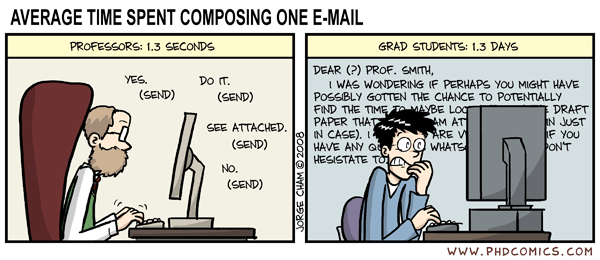
The Beginning (of class, at least)
Dear Dr. O. wants us to blog about our experiences with a) the class: Applied Technologies in Library Practice b)those newfangled web 2.0 technologies and c) our expectations of said class.
So let's see...my background. I have a nodding acquaintance/regular relationship with some of the technologies we'll be learning about: RSS feeds(love those), social networking (wait...I need to go check my facebook account for a sec...), social bookmarking (I have a delicious account but don't use it much), mashups (???? never heard of 'em), twitter (I'm on it but think it's sorta dumb for personal use), Wikipedia (what was life like before it existed??) and lastly, Second Life, which seems like a complete waste of time to me. So there you have it. I know a bit about the other technologies we will discuss in the later modules and quite a bit about open source software as my husband is the program manager for PINES and he eats and breathes OSS. :)
So let's see...my background. I have a nodding acquaintance/regular relationship with some of the technologies we'll be learning about: RSS feeds(love those), social networking (wait...I need to go check my facebook account for a sec...), social bookmarking (I have a delicious account but don't use it much), mashups (???? never heard of 'em), twitter (I'm on it but think it's sorta dumb for personal use), Wikipedia (what was life like before it existed??) and lastly, Second Life, which seems like a complete waste of time to me. So there you have it. I know a bit about the other technologies we will discuss in the later modules and quite a bit about open source software as my husband is the program manager for PINES and he eats and breathes OSS. :)
Subscribe to:
Posts (Atom)


